
Find The Needle conveyors and power
Place conveyors with Demo V8 snap and pathfinding, use F for No Snap Mode, and shut the whole power network with E on a pole.
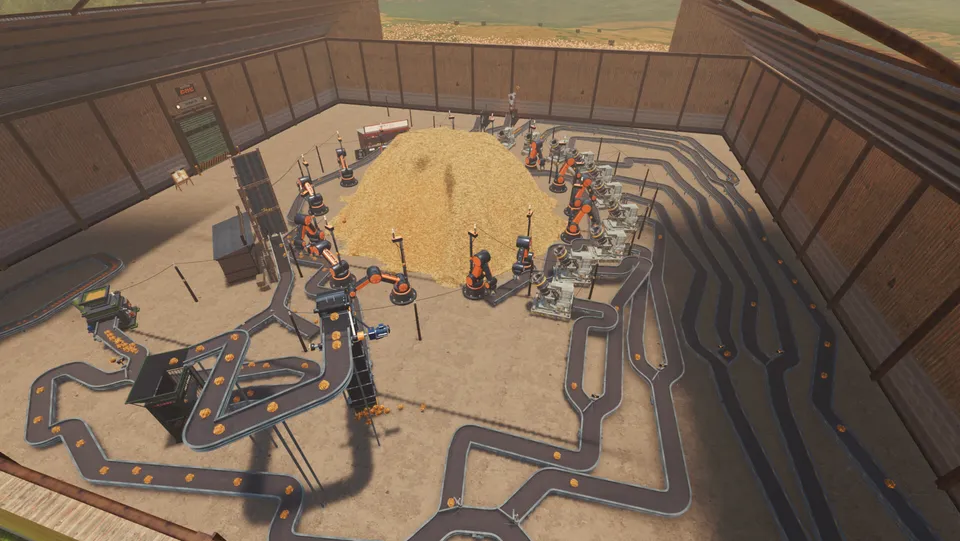
Conveyors after Demo V8
The Demo V8 announcement reworked conveyor snap and pathfinding, made the Hay Sell Stand inbound belt snap, and added U-Splitters and U-Joiners.
Practical order:
- Snap a belt from supply to the Hay Sell Stand
- Press F for No Snap Mode when automatic snap grabs the wrong neighbor
- Branch with U-pieces only after the money line is stable
Named logistics parts also appear in the machines index.
Power poles and the E shutdown
Press E on a power pole to shut down the whole electricity network — not a single lamp. V8 also adds a low-power visual warning when the grid falls below the required threshold.
After a shutdown, restore power before blaming a “broken” processing machine. Large yards are CPU heavy; see system requirements.
Fixing a stalled line
- Confirm hay is spawning onto the belt, not only near it
- Check for a No Snap segment that never connected
- Follow each branch through any scanner before the booth (scanners and needles)
- Look at Pellet Disc BRICKS / HAY lamps if that machine is on the route (hay products)
Practice these controls in the Demo before redesigning a full Mountain save.
Related Articles
factory
Find The Needle machines index
Look up named machines and logistics parts for Find The Needle: belts, sell stand, power poles, scanners, arms and processing gear.
guides
Find The Needle beginner guide
Start your first Find The Needle hour: dig hay by hand, sell at the stand, buy a mover, then snap a belt that keeps the yard earning.
guides
Find The Needle scanners and needles
Trace needles through scanners, silos and hay wads so packaged products do not sell a needle back into the pile before you collect it.
Was this helpful?
Thanks for the feedback!